Autopilot — running the whole pipeline without driving each step¶
Status: v0.1 · 2026-10-26.
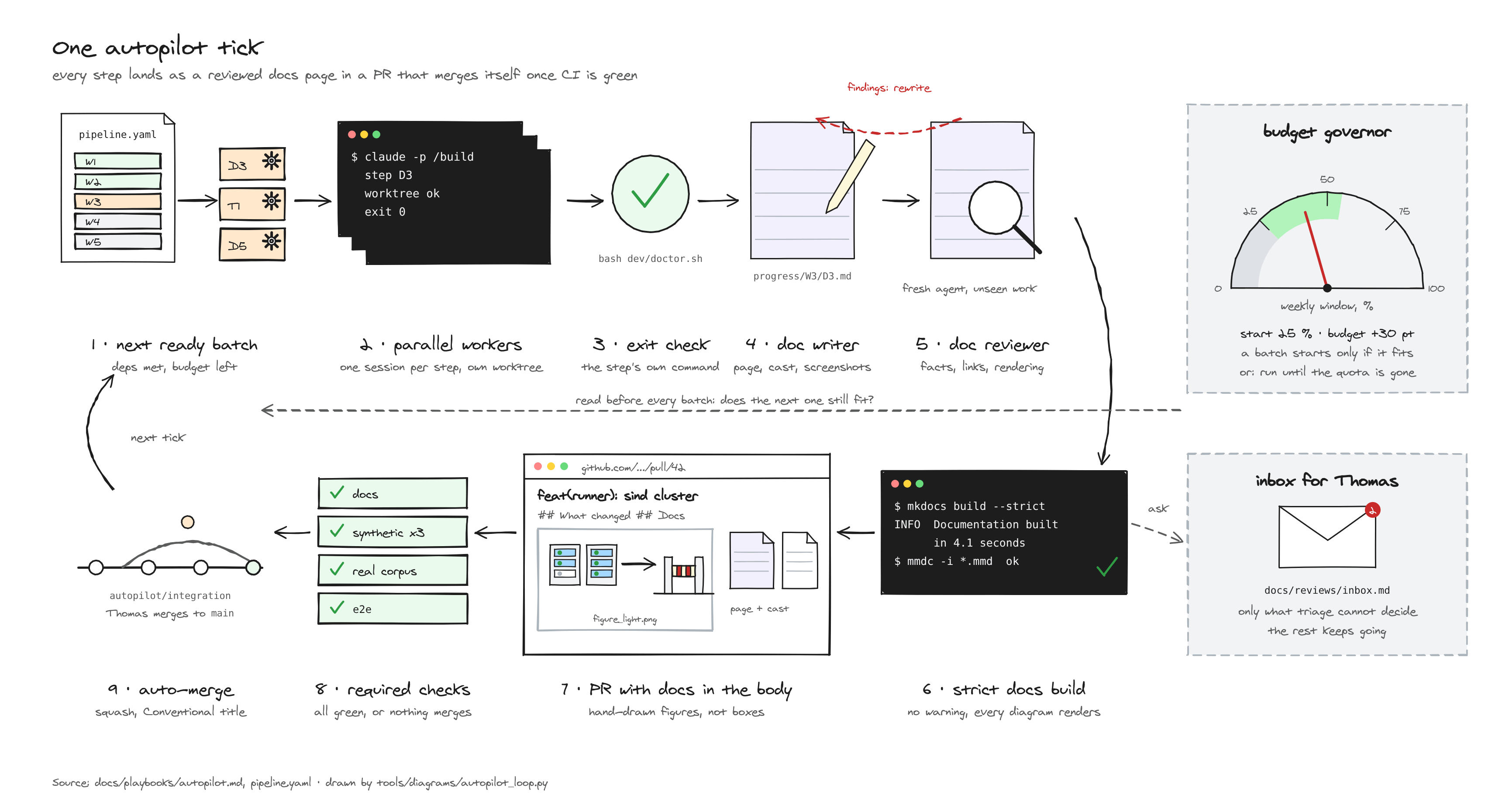
The steps in next-phase.md are not a to-do list for a person. They are the nodes of a pipeline (pipeline.yaml) that the /autopilot skill runs:
- in parallel where it can;
- verifying each step;
- triaging findings by a written policy (
triage-policy.md); - committing as it goes.
Thomas is needed in two places only:
- the inbox (
docs/reviews/inbox.md), answered whenever convenient: work continues meanwhile on reversible assumptions; - the
GOgate before product code.
1. Why small steps, if nobody runs them by hand¶
| Reason | Effect |
|---|---|
| Each step has one question and one owner agent | focused context, better findings, less hallucination |
| Each step has an output file and an exit check | the orchestrator can verify instead of trusting a summary |
| Steps declare their dependencies | independent steps run in parallel (wave W1 runs 8 at once) |
State is in git (.autopilot/state.json) |
any session can resume: local, cloud, a routine, the headless runner |
| Writers are serialised, builds use worktrees | parallel agents never edit the same files |
The 31 steps collapse into 5 waves:
| Wave | What runs | Human? |
|---|---|---|
| W1 | 7 review rounds + the cloud-environment spike, all in parallel | no |
| W2 | triage → apply → journeys and API-contract reviews → triage → apply | inbox only |
| W3 | bootstrap / doctor, CI, dev previews, fixture workflows, engine capture, sind, kind + Kueue, scenarios, Playwright | inbox only |
| W4 | synthesis (MVP cut), walking-skeleton plan, GO | yes |
| W5 | milestone plans, then implementation by subagent-driven development | inbox only |
2. The mechanisms underneath¶
| Layer | Claude Code feature | Role |
|---|---|---|
| One tick | the /autopilot skill |
read state, run ready steps, verify, triage, commit, print a status line |
| Fan-out inside a step | subagents in parallel; dynamic workflows for large or cross-checked rounds | many reviewers or builders per step, with their results kept out of the orchestrator's context (workflows) |
| Tick after tick | /goal with a completion condition, checked by a separate model after every turn |
keeps going without prompts; stops at the condition, or when no progress is made (goal) |
| No per-tool prompts | auto permission mode | a classifier reviews actions (headless) |
| Unattended, machine off | a cloud session, or a routine | keeps running after the laptop closes; a routine can restart a tick nightly (cloud, routines) |
| Scripted | claude -p with stream-json and --max-budget-usd |
tools/autopilot/run.sh, for a VM or CI |
3. How to run it¶
A. Interactive, on your machine, watching.
/goal Run /autopilot tick after tick until the latest AUTOPILOT status line shows nothing ready and every remaining step is done, waiting_human or blocked. Stop after 60 turns.
Use auto mode (Shift+Tab until "auto"), or answer prompts as they come. /goal (no argument) shows progress, and /goal clear stops.
B. In the cloud, laptop closed.
- Push the repository and install the Claude GitHub App on it.
- Open claude.ai/code, pick the repository and the "Spectio" cloud environment (see
docs/specs/dev-environment-and-testing.md§2), and choose auto mode. - Paste the same
/goalline. - Check it from your phone. Answers go in
docs/reviews/inbox.md, either in a commit or by telling the session.
C. Headless, on any machine with Claude Code signed in (a laptop, or a codespace).
tools/autopilot/run.sh --weekly 30                # at most 30 points of the weekly window
tools/autopilot/run.sh --until-exhausted          # the rest of the 5-hour window, stop when it resets
tools/autopilot/run.sh --until W3 --tick-usd 15   # no plan budget: a USD cap per tick only
Each tick is a separate claude -p "/autopilot …"; the shell loop checks the budget before every tick (§6).
D. Nightly continuation (routine). Create a routine at claude.ai/code/routines, or with /schedule in the CLI:
- repository
weber8thomas/spectio; - the Spectio environment;
- schedule: daily at 02:07.
The routine's prompt:
Run /autopilot repeatedly (at most 10 ticks) on branch autopilot/integration, then
update the PR to main with the journal. Read docs/reviews/inbox.md first and apply any
answers. Stop early when nothing is ready.
Steering in between:
/autopilot --dry-runshows what would run next;/autopilot --only R5runs one step;/autopilot --until W2stops after a wave;- setting a
blockedstep back topendinginstate.jsonretries it.
4. Permissions to add yourself¶
Agents may not change their own permission rules, so add these yourself. You can put them in .claude/settings.local.json for your machine only, or commit them to .claude/settings.json for every session, including cloud ones:
{
  "permissions": {
    "allow": [
      "Workflow",
      "Bash(git fetch *)", "Bash(git switch *)", "Bash(git checkout *)",
      "Bash(git merge *)", "Bash(git rebase *)", "Bash(git add *)", "Bash(git commit *)",
      "Bash(git push origin autopilot/*)",
      "Bash(bash dev/doctor.sh *)", "Bash(node tools/canvas/render.js *)",
      "Bash(uvx --with mkdocs-material mkdocs build *)"
    ],
    "deny": [
      "Bash(git push --force *)", "Bash(git push -f *)", "Bash(git push origin main *)",
      "Bash(git branch -D *)"
    ]
  }
}
For the budget governor (§6), also add the status-line tap and the limit hook:
{
  "statusLine": {"type": "command", "command": "python3 tools/autopilot/statusline.py", "refreshInterval": 60},
  "hooks": {
    "StopFailure": [{"matcher": "rate_limit", "hooks": [{"type": "command", "command": "python3 tools/autopilot/budget.py limit-hit --reason rate_limit"}]}]
  }
}
Workflow lets dynamic workflows start without a prompt in -p and in scheduled runs (workflows: approve the plan).
Protect main with a GitHub branch rule that requires a PR and a review. The autopilot only pushes autopilot/* branches and opens PRs.
5. Budget and safety¶
- Cost. Each tick fans out several agents; W1 alone starts about 15 to 25 agents. Bound a run with
--max-budget-usd(headless), a turn clause in the/goalcondition, or--until <wave>. Dynamic workflows show a "Large workflow" warning above 25 agents. Start with--until W1to see the real cost of one wave. - Reversibility. Every change is a commit on
autopilot/integration, and every triage decision is in the review file and the journal. Assumptions are labelled in the specs. - No silent weakening. The orchestrator may not edit exit checks or statuses in
pipeline.yaml, and it never merges tomain. - Failures. A step that fails twice becomes
blocked, with an inbox entry. Two ticks without progress make/goaljudge the condition impossible, and the run stops.
6. Budget governor: a share of the weekly window, or until the quota runs out¶
Spectio is a side project, so the autopilot spends only what Thomas gives it. How it was built and tested: F7. The budget is set when a run starts, at any time of the week:
| You say | Command | What happens |
|---|---|---|
| "use 30 % of my week" | run.sh --weekly 30, or /autopilot --budget 30%w |
at most 30 percentage points of the weekly window, counted from now; if the 5-hour window fills first, the loop waits for its reset and continues |
| "use 40 % of this 5-hour window" | run.sh --five-hour 40 |
the same, on the 5-hour window |
| "eat the rest of my quota" (Wednesday 11:00, window resets 15:00) | run.sh --until-exhausted |
runs until the 5-hour window is used up, and stops when it resets at 15:00 at the latest |
| "the rest of my week, but stop at 18:00" | run.sh --until-exhausted --window seven_day --deadline 18:00 |
runs until the weekly window is used up or 18:00 |
Where the numbers come from (sources: docs/research/budget-and-telemetry-2026-10-26.md §A1):
- Claude Code exposes plan usage only to the status line:
rate_limits.five_hourandseven_day, each withused_percentageandresets_at, for Pro and Max subscribers, after the first answer of a session. tools/autopilot/statusline.pywrites them to.autopilot/usage.json(the readings are account-wide, so other use of the plan during the run counts too).- No environment variable, CLI command, hook input or OpenTelemetry metric reports the remaining quota.
- Headless ticks (
claude -p) have no status line. The governor then estimates: the last live reading plus the USD reported by each tick (total_cost_usd) times a percent-per-USD ratio. The ratio is calibrated from live readings (median of the last 20 samples), or given with--pct-per-usd. - With no reading at all, say where you are:
--now 42, read from/usage.
The rules (tools/autopilot/budget.py, tested in test_budget.py):
- Points, not levels. The budget counts points consumed since the start, summed over readings, so a weekly reset during the run does not reset the budget.
- A batch is sized to fit. Before each tick,
budget.py check --kinds <kinds of the ready batch>estimates each step from the median cost of past steps of the same kind, and returns how many fit under the remaining budget minus a margin. The margin is the larger of 2 points and the largest step estimate. The tick runs with--max-parallelset to that number. -
Wait, or stop.
- When the 5-hour window is full but the weekly budget is not, the loop sleeps until
resets_at+ 2 min. - It stops when the budget is used, the deadline passes, a plan limit is hit, nothing is ready, or two ticks finish no step.
- When the 5-hour window is full but the weekly budget is not, the loop sleeps until
-
Limits are detected, throttles are not counted. The
StopFailurehook with matcherrate_limit, or a streamapi_retrywith errorrate_limitafter the last retry, writes.autopilot/limit-hit.json. A capacity throttle ("not your usage limit") is retried and does not count. - A step stopped by a limit does not use up a retry. It is set back to
pendingwith the notelimit. - Visible. The AUTOPILOT status line ends with
budget=12.4/30pt 7d (live, window 52%).
Interactive runs (/goal or /loop).
- The tick runs
budget.py checkitself before dispatching (skill §1). - Auto-continue at the usage limit covers only waits under 24 hours, and at most two of them. It never covers the weekly limit, and it does not apply to Remote Control.
- The weekly budget is therefore always enforced by the governor, not by waiting.
[to be validated]
- whether the status line runs in cloud sessions;
- the exact payload of
claude -pwhen the plan limit is hit, including anyrate_limit_eventmessage.budget.py ingest-streamreads it when present.
7. Docs in the loop¶
Every step leaves its pages (docs/specs/documentation-system.md §3). The pages so far are under Progress; the foundations wave W0 is F1 to F7.
During the step:
doc-writerkeeps the step's Progress page (docs/progress/<wave>/<step>.md) up to date;diagram-artistandmedia-captureproduce the figures and media the step kind requires.
After the exit check:
- the tick runs the docs gate (
documentation-system.md§3.3); doc-reviewerscores the pages with a fresh context.
Outcome:
changessends the step back todoc-writer, at most twice, then the step isblocked;approvelets the step reachdone, and its PR body is generated from the Progress page.
8. Pull requests and auto-merge¶
One PR per step, from autopilot/<step-id> into autopilot/integration, and a running promotion PR autopilot/integration → main.
When a PR merges by itself (documentation-system.md §8): bodies carry the docs, figures and media, and GitHub's native auto-merge merges them once:
- the required checks pass;
- the
doc-reviewerreview approves.
Where auto-merge applies.
- PRs into
autopilot/integrationalways auto-merge. - The promotion PR to
mainauto-merges only once Thomas sets the repository variableAUTOMERGE_MAIN=true.
Never auto-merged: human_gate steps, the release PR, and changes to workflows, settings, auth code or pipeline.yaml.
One-time setup, done by Thomas. Agents cannot change repository settings:
gh repo edit weber8thomas/spectio --enable-auto-merge --delete-branch-on-merge
for b in main autopilot/integration; do
  gh api -X PUT "repos/weber8thomas/spectio/branches/$b/protection" --input - <<'JSON'
{"required_status_checks": {"strict": true, "contexts": ["docs-gate", "pr-body", "nextflow 26.10.3", "nextflow 25.10.9", "snakemake 9.27.1"]},
 "enforce_admins": false, "required_pull_request_reviews": {"required_approving_review_count": 1},
 "restrictions": null, "allow_force_pushes": false, "allow_deletions": false}
JSON
done
gh variable set AUTOMERGE_MAIN --body false   # set to true to let CI merge into main